Learn Cryptonite
Everything you need to know about our platform, tools, and how to get started
Overview
The Platform
Cryptonite is a crypto prop trading platform that gives traders access to funded accounts. Instead of risking your own capital, you trade with ours — and keep up to 90% of the profits.
The platform is built around a simple evaluation model: you pick a challenge, prove your trading skills within a set of risk parameters, and once you pass, you receive a fully funded account to trade crypto markets 24/7.
Trade Bitcoin, Ethereum, and hundreds of altcoins with real-time Binance price feeds.
Professional charting tools built directly into the trading interface.
Crypto never sleeps — trade any time, any day, with no restrictions.
Keep the majority of what you earn on your funded account.
Leaderboard
The Cryptonite Leaderboard is a public ranking of the best-performing traders on the platform. It tracks real-time performance across all funded accounts and challenge evaluations.
The leaderboard includes a built-in trading simulator where anyone can practice strategies risk-free before committing to a challenge. Use it to test your edge, learn the interface, and compete with other traders — all without putting up any capital.
The leaderboard and simulator are completely free. No sign-up required to view rankings — create an account to start simulating.
Broker
The Broker is the core trading environment where funded traders execute their strategies. Once you've passed your challenge evaluation, you receive access to a funded account within the Broker.
Inside the Broker you'll find your dashboard with account stats, open positions, trade history, and performance analytics. It's also where you manage your challenge, request payouts, and monitor your drawdown limits in real time.
Getting Started
Create an Account
Sign up for free and get a demo account to practice before going live
Creating a Cryptonite account is free and takes less than a minute. Head to the registration page and fill in your details:
Required
- ✓ Email address
- ✓ Password (min. 8 characters, must include a number and uppercase letter)
- ✓ Country
- ✓ Phone number
Optional
- — First name & last name
- — Address, postal code, city
Once you register, you'll receive a free demo account so you can explore the platform, familiarize yourself with the trading interface, and practice your strategies with simulated funds — all without any risk.
50% Discount on your first Challenge
If you successfully complete your demo account evaluation, you'll earn a 50% discount on the purchase of your first official challenge. It's our way of rewarding traders who prove their skills before going live.
Purchasing a Challenge
How to Pay with Card or PayPal
The fastest way to purchase a challenge — instant activation after payment
Choose your Challenge
Visit the Programs page and browse the available challenges. Each card displays the price, funded account size, profit target, drawdown limits, and profit split. Click Buy Challenge on the one that suits your trading style and capital goals.
Available account sizes: $5,000 · $10,000 · $25,000 · $50,000 (Beginner program). Advanced and Professional tiers are unlocked as you progress.
Fill in your Details
If you don't have an account yet, you'll be asked to create one during checkout. Enter your email, password, country, and phone number. If you already have an account, simply log in and you'll skip this step.
Select Payment Method
On the payment screen, choose Pay with PayPal or Credit Card. This option supports Visa, Mastercard, and PayPal. The payment is processed securely through Stripe — your card details are never stored on our servers.
Complete Payment
Enter your card details or log in to PayPal to finalize the purchase. Once the payment is confirmed, your challenge is activated instantly — you'll be redirected to your dashboard where you can start trading right away.
Start Trading
After a successful payment you'll see a confirmation screen with your transaction details and challenge summary. Click Start Challenge to open the trading dashboard. Your evaluation begins as soon as you place your first trade.
Having issues with your payment? Reach out to our support team at support@cryptonite.trade and we'll help you get started.
How to Pay with Crypto
Step-by-step guide to purchasing a challenge using cryptocurrency
Choose your Challenge
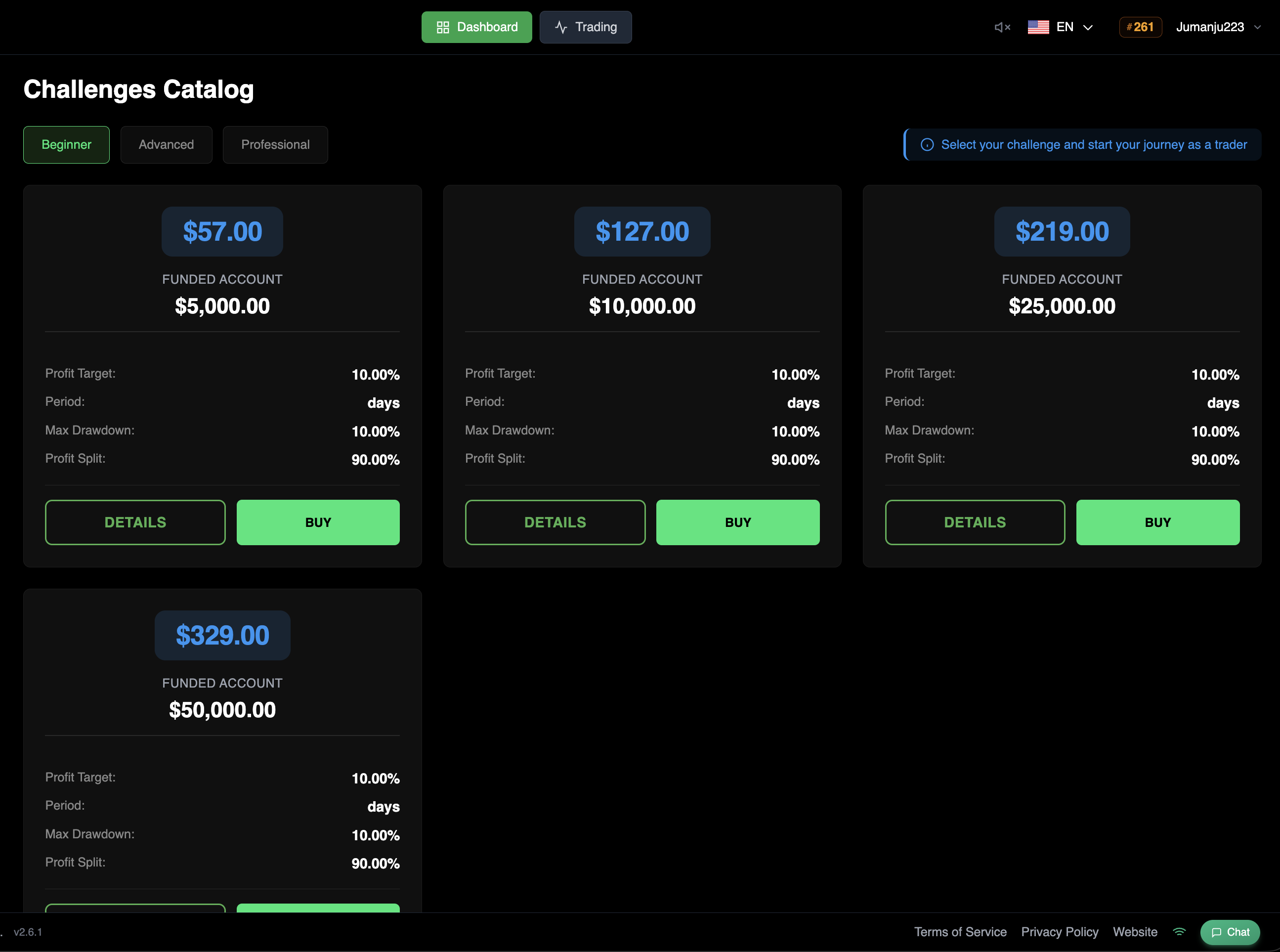
Head to the Challenges Catalog in your dashboard. You'll see all available programs organized by level — Beginner, Advanced, and Professional. Each card shows the challenge price, funded account size, profit target, maximum drawdown, and profit split. Click BUY on the challenge you want to start.
Select Payment Method
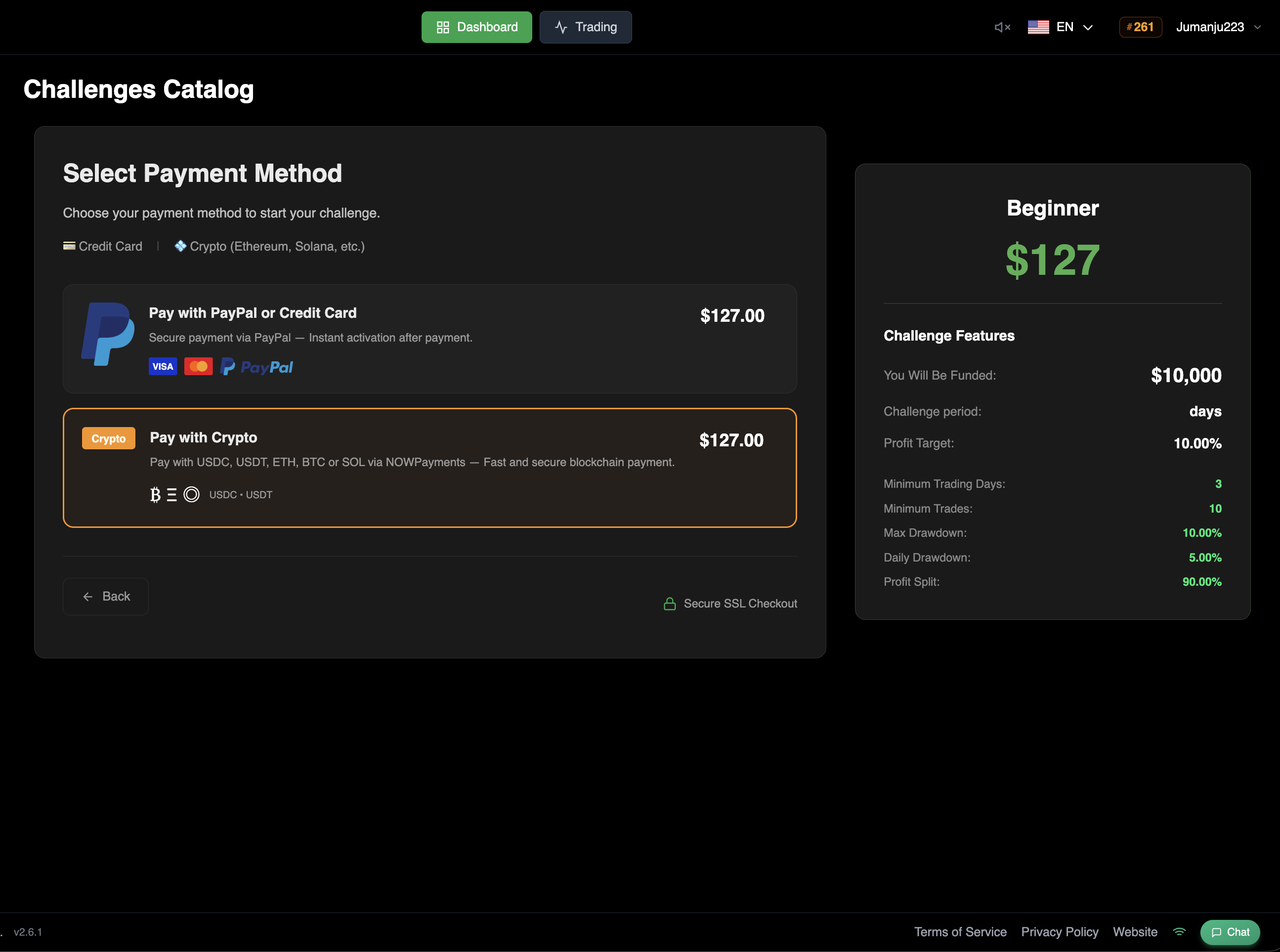
On the payment screen you'll see two options: Pay with PayPal or Credit Card for instant activation, or Pay with Crypto for a fast and secure blockchain payment. Select the crypto option. You'll see the supported tokens (USDC, USDT, BTC, ETH, SOL, and more) displayed below. On the right side, a summary shows the challenge details and features.
Choose Network & Token
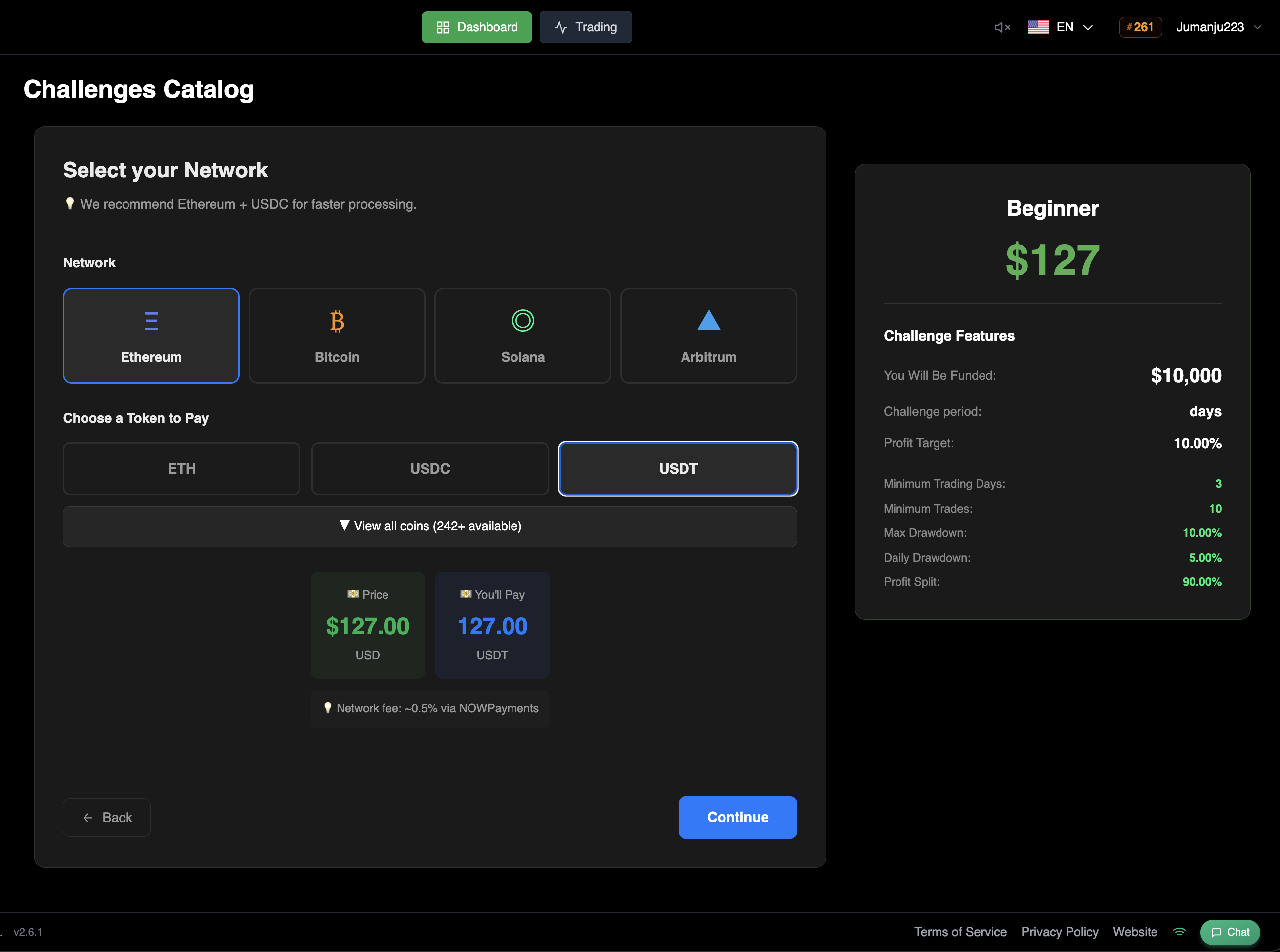
Select the blockchain network you want to pay on — Ethereum, Bitcoin, Solana, or Arbitrum. We recommend Ethereum + USDC for faster processing. Then pick the token you'd like to pay with (ETH, USDC, USDT, or browse 242+ available coins). The exact amount you'll pay is shown at the bottom, along with an estimated network fee of ~0.5% via NOWPayments. Click Continue to proceed.
Send Your Payment
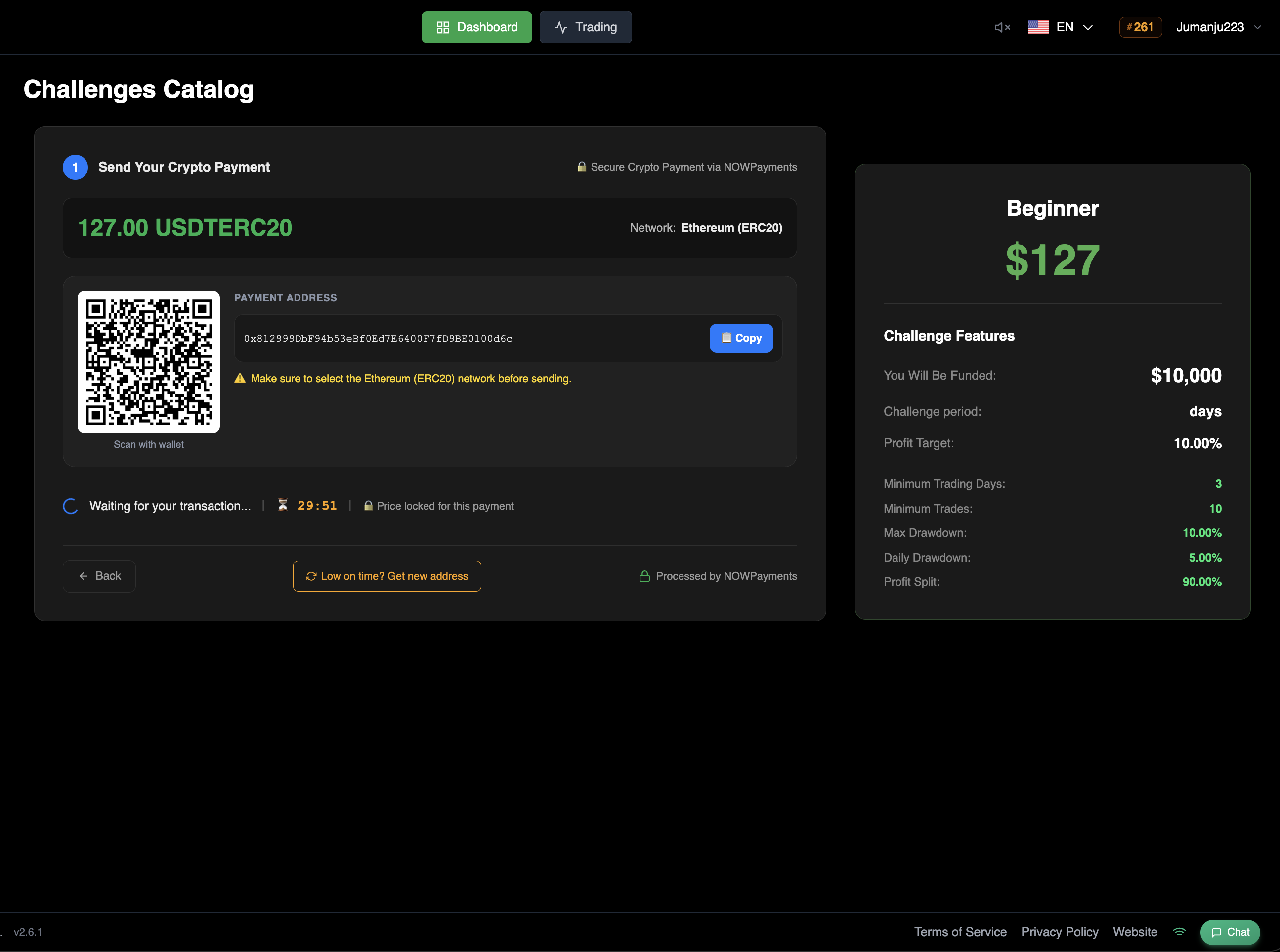
You'll now see your unique payment details: a QR code and a payment address. Send the exact amount displayed to this address from your wallet. Make sure to select the correct network (e.g. Ethereum ERC20) when sending — using the wrong network may result in lost funds.
Important
A 30-minute countdown is active. You must send the payment before it expires. If it runs out, click "Late on time? Get new address" to generate a fresh payment address.
Automatic activation
Once the blockchain confirms your transaction, the system will automatically detect the payment and activate your challenge. No manual action needed — you'll be ready to trade within minutes.